RecallDock
Restore your plugin windows.
Exactly how you left them.
Ableton saves parameters. RecallDock saves your workspace.
macOS 12+ & Windows 10/11 • Ableton Live 12 Suite • VST & AU
Watch the demo
See RecallDock in action and how it restores your workflow.
Stop reopening stacked, misplaced, or hidden plugin windows.
Free trial: Recall up to 2 plugin windows per session. Purchase unlocks unlimited recall.
No cloud. No telemetry. Just instant session consistency.
Current version v4.7 · What's new
Restore your plugin windows. Exactly how you left them.
Ableton saves parameters. RecallDock saves your workspace.
Free trial: Recall up to 2 plugin windows. Purchase unlocks unlimited recall.
If you use complex VST or AU chains, floating plugins, multiple monitors, or tight visual layouts — you already know the pain. Windows reopen stacked, misplaced, hidden, or just wrong.
RecallDock fixes that.
What It Does
RecallDock restores:
- Plugin window position
- Visibility state (open / closed)
Every time you load your session.
Your mix layout comes back exactly how you designed it.
Why It Exists
Ableton Live does not restore plugin window geometry.
No native feature.
No built-in solution.
No other Max for Live device handling this cleanly.
RecallDock fills that gap.
If your visual layout matters to your workflow — this is not optional.
How It Works
RecallDock is purpose-built with two lightweight parts, each with one job:
- Max for Live device (.amxd)Saves your plugin window layout per project and triggers recall when you reopen.
- Native helper app (macOS & Windows)Restores plugin windows to their saved positions across one or multiple monitors. Runs as a menu bar app on macOS and a system tray app on Windows.
On macOS, the helper requires Accessibility permission so it can move plugin windows into position.
On Windows, the helper runs as a standard system tray application — no extra permissions required.
No cloud. No telemetry. No weird automation scripts.
Open a project and your workspace comes back exactly where you left it—every time.
Built For Producers Who
- Use lots of third-party plugins
- Work across multiple monitors
- Care about visual mix ergonomics
- Want sessions to feel consistent every time
If you open plugins constantly while mixing — this pays for itself immediately.
Installation
macOS
- Download the DMG
- Drag RecallDock Helper into Applications
- Open it once (approve macOS Accessibility permission)
- Insert the .amxd device into any Ableton track
- Keep the helper running in your menu bar
Windows
- Download the Windows installer (.exe)
- Run the installer and follow the prompts
- Launch RecallDock Helper — it appears in your system tray
- Insert the .amxd device into any Ableton track
- Keep the helper running in your system tray
That's it.
Requirements
macOS
- macOS 12 (Monterey) or later
- Ableton Live Suite 12
- Supports VST & AU
- Helper app must be running
Windows
- Windows 10 or Windows 11
- Ableton Live Suite 12
- Supports VST
- Helper app must be running
Ready to lock in your Ableton workflow?
Start with the free trial, then unlock unlimited recall when you're ready.
Getting Started Video
Need the setup walkthrough? Watch this before your first session.
Updates
RecallDock automatically checks for updates when the app launches. If an update is available, you’ll be prompted to download it.
See what changed in each version on the RecallDock changelog.
FAQ
Which Ableton plug-in window settings are required?
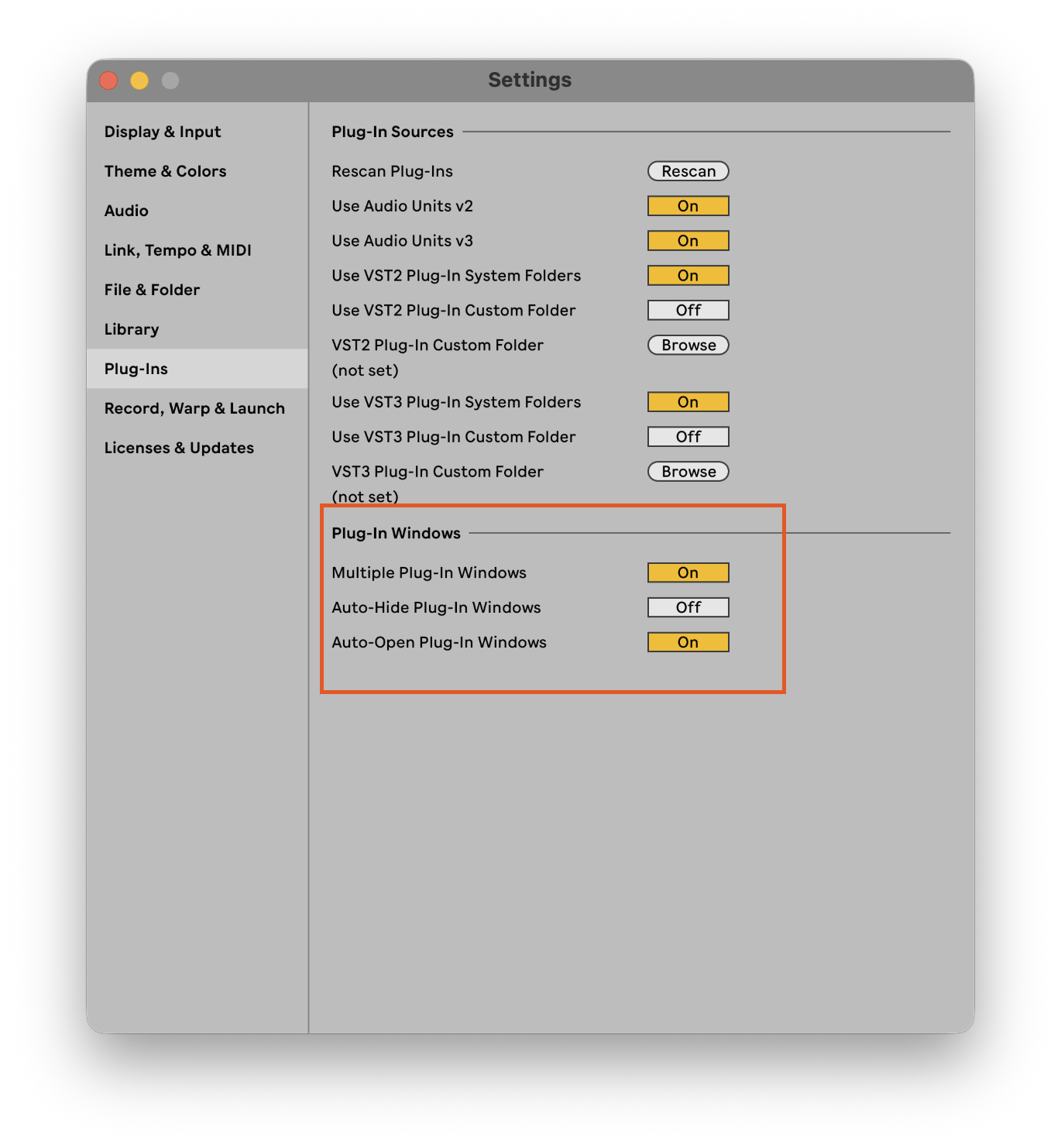
For RecallDock to work correctly in Ableton Live, Auto-Hide Plug-In Windows MUST be OFF and Multiple Plug-In Windows MUST be ON.
What are the system requirements?
macOS: macOS 12 (Monterey) or later, Ableton Live 12 Suite. Supports VST & AU.
Windows: Windows 10 or Windows 11, Ableton Live 12 Suite. Supports VST.
What are the trial limitations?
The free trial recalls up to 2 plugin windows per session.
Should I take a new snapshot after changing plugins?
Yes. If you delete plugins or move them around after saving a plugin window snapshot, it is recommended to take a new snapshot. Otherwise, recall can be slower while RecallDock searches for missing plugin windows until timeout.
How do RecallDock updates work?
RecallDock automatically checks for updates when the app launches. If an update is available, you’ll be prompted to download it.
How much does RecallDock cost?
Pricing is shown on the secure checkout page. Click "Buy for $20" to view checkout.
Can RecallDock restore plugin window sizes?
No. RecallDock restores plugin window position and visibility, but not plugin window size.
Open your session. Everything is exactly where it belongs.
Ableton saves parameters. RecallDock saves your workspace.
If you care about flow, speed, and session consistency — you’ll feel the difference immediately.
Changelog · Legal: Privacy Policy | Terms of Use
← Back to Tools & Products